Quantimet provides environmental data in Meteorological Aerodrome Reports, or METAR. To help familiarize you with the terminology inside these reports, this page provides additional context for all users, from the casual observer to trained weather personnel.
A list of commonly used units and abbreviations are listed below:
- METAR (Meteorological Aerodrome Reports) – A format commonly used for reporting weather information within the pilot, meteorologist and weather forecasting spaces. It is a compact way of encoding and displaying important weather information. METAR formatting follows the standards presented using AF-MAN15-111 issued by the Air Force.
- SM (Statute Mile) – Equivalent to a land mile of 5,280 ft.
- NM (Nautical Miles) – Equivalent to approximately 6,080ft.
- kt (Knots) – Equivalent to 1 Nm per hour of speed
- inHg (Inches of Mercury) – Unit of ambient pressure
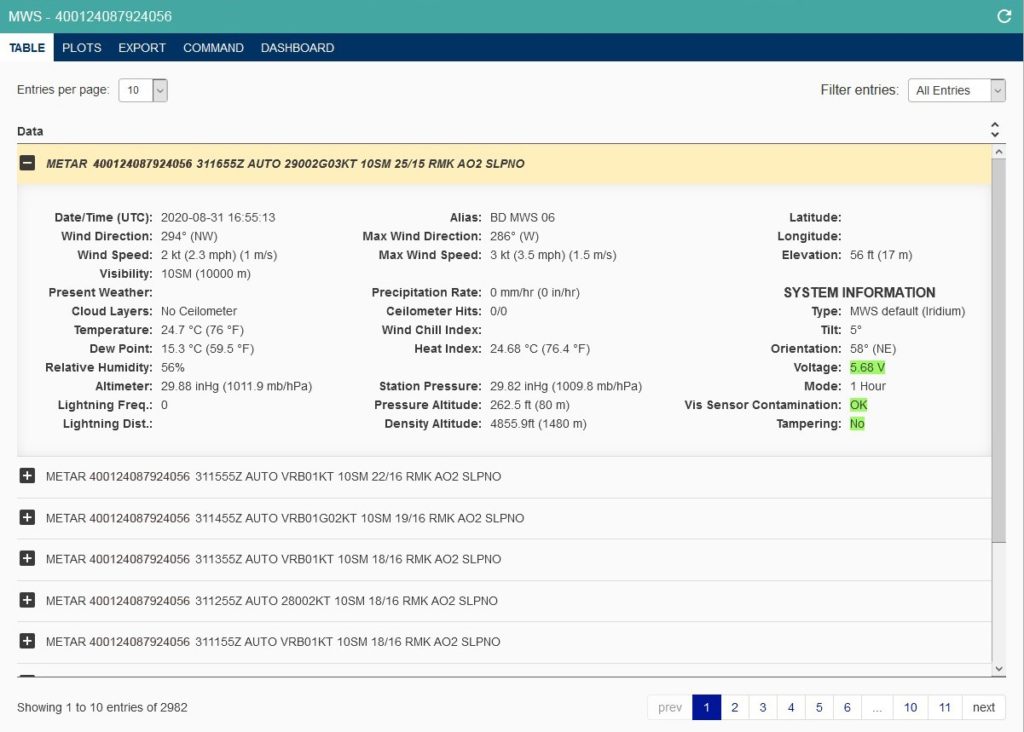
The data presented in the Table Tab falls into two basic categories: weather data and system information.
- Ceilometer Hits (if applicable) – This field shows the number of measuring attempts and how many of those detected a cloud layer. For example, “2/4” means out of four attempts, only two cloud layers were detected.
- Ceilometer (if applicable) – This field will report one of the following options:
- “No Ceilometer” if hardware is not present
- “NCD” if the hardware is present but detection attempts found no clouds
- Up to four cloud layers detected during the measurement period. Example readings include “800, 1100, 1500 ft” or “900 ft.”
NOTE: Per AFMAN15-111 guidelines, cloud layers are rounded depending on their value. Duplicate cloud heights are then grouped. If a measurement cycle measured cloud layers at 800, 1200, 800, and 1500, only “800, 1200, and 1500 ft” will be reported.
- Present Weather – The MWS can report any one or combination of the following options:
- +RA – Rain is more than 0.4 in/hr
- RA – Rain is between 0.1 in/hr and 0.4in/hr
- -RA – Rain is between 0.0 in/hr and 0.1 in/hr
- FG – Fog
- HZ – Haze
- BR – Mist
- Voltage – This field will change colors to represent battery charge, where green, orange, and red will denote “good,” “sufficient,” and “low” battery levels, respectively. The battery depleting faster than it can charge (during sunlight conditions) is an indication its reporting mode is too frequent, too many images have been requested, and/or the unit should be relocated to receive more sunlight.
- Visibility Sensor Contamination – This field will report one of the following options:
- OK – Visibility sensor is clear of obstruction
- Interference – Obstruction detected on the visibility sensor
- Tampering – Tampering compares data from the current observation to an observation in the previous hour. The field is marked “yes” if any of the following conditions are met:
- Latitude has changed more than 0.005
- Longitude has changed more than 0.005
- Elevation has changed more than 3.0
- Tilt has changed more than 5.0
- Orientation has changed more than 10.0